
Using Your One-Click Opt-In Link with Klaviyo
The opt-in link allows you to add existing subscribers from your Klaviyo list directly into a PerkZilla campaign with a single click — no re-confirmation required.
Step 1: Get Your Opt-in Link
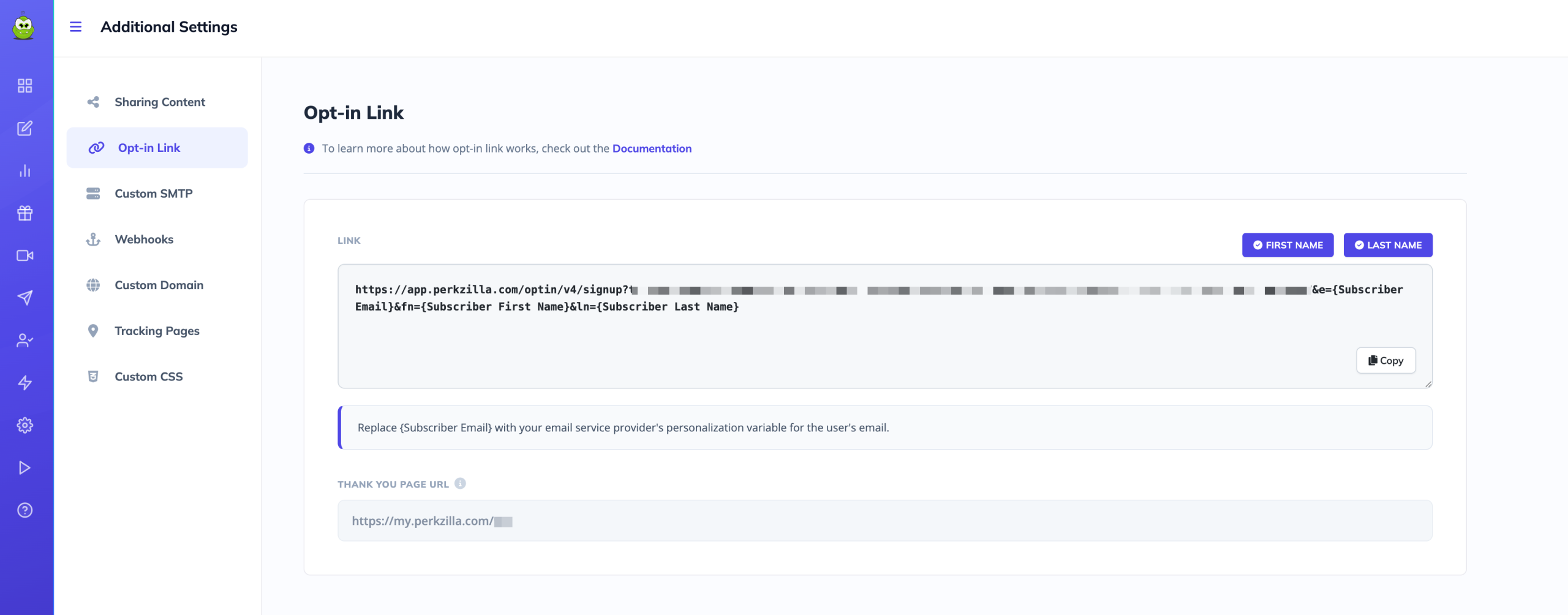
- Go to Additional Settings for the campaign you want to use
- Click Opt-in Link in the left menu
- Click Copy to copy the link to your clipboard
Step 2: Replace the Email Placeholder with the Klaviyo Tag
Your link will contain {Subscriber Email} as a placeholder. Replace this with Klaviyo's personalization tag so each recipient's email is inserted automatically when the link is clicked.
Replace {Subscriber Email} with {{person.email}}
Your final link should look like this:
https://app.perkzilla.com/optin/v4/signup?u=YOURKEY&e={{person.email}}&fn={{person.first_name}}&ln={{person.last_name}}Step 3: Add the Link to Your Klaviyo Email
Paste the completed link into any Klaviyo email as a button or hyperlink. When an existing subscriber clicks it, they will be automatically enrolled in your PerkZilla campaign without needing to fill out any form.
Need Help?
Updated on: 03/05/2026
Thank you!